Teaching a Register Mark: What the Machine Actually Saves
Teardown A2. Pressing SAVE in Teach mode feels like taking a photo of the mark. It isn't. Four lessons about what gets stored, why box size matters, why Teach OK can still fail in production, and what happens when you teach the wrong thing.
In A1 we walked the whole registration loop. Step 1 was “teach”: drag a box around the register mark, press SAVE, done. I’ve done it a thousand times without thinking. This note zooms into that single button press — and four lessons that came out of it, each learned the hard way.
Lesson 1: SAVE doesn’t save a picture
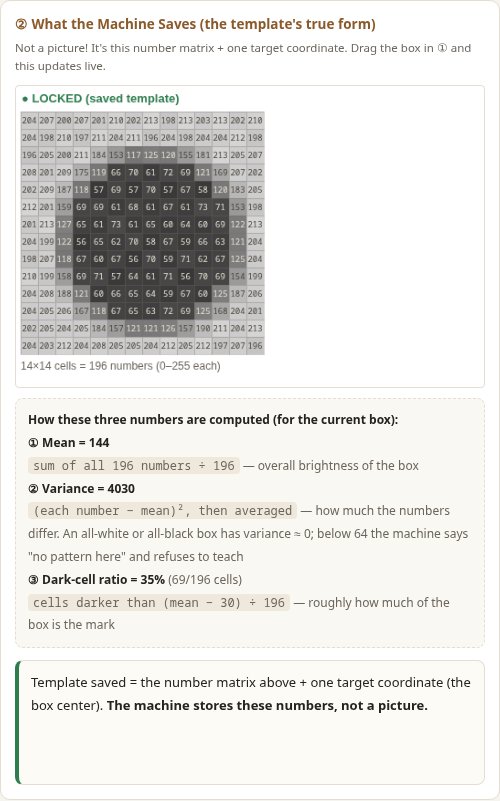
I always assumed the machine filed away a small photo of the mark. It doesn’t. What it stores is a number matrix — one brightness number (0–255) per pixel inside your box — plus one target coordinate (where the box center sits right now). If your box is 14×14 pixels, the “template” is 196 numbers.
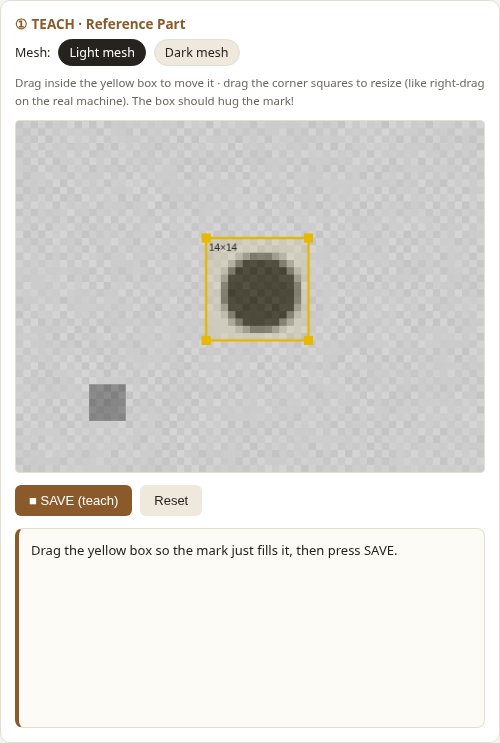
There is no image in memory, and no concept of “circle” or “cross”. The machine never knows what the mark looks like — only what its pixels add up to.
Before accepting a teach, the machine runs two quick checks on those numbers:
- Variance — how much the numbers differ from their own average. A blank area (all background) has variance near zero; below a threshold the machine refuses: no pattern here. That’s why you can’t teach an empty corner.
- Dark-cell ratio — roughly what fraction of the box is the mark itself. The machine won’t stop you here. As Lesson 2 shows, maybe it should.
Lesson 2: The box should hug the mark
“Does box size matter, as long as the mark is inside?” I thought not. Same mark, same day, two teaches — measured on the very next sheet:
| Top 3 scores | Margin (1st − 2nd) | |
|---|---|---|
| Tight box (hugs the mark) | 1.00 / 0.86 / 0.86 | 0.14 |
| Oversized box | 1.00 / 0.93 / 0.93 | 0.07 |
The winner scores a perfect 1.00 both times — that’s the trap. The teach screen says everything is fine. But look at second place: with the big box it climbs from 0.86 to 0.93, and the margin halves.
Why? An oversized box is mostly flat background, and flat background looks like flat background everywhere. Every random position in the search area picks up free points from all that matching emptiness, while the mark’s own pixels — the only part that actually identifies the location — become a minority vote.
A small margin is what “the machine is hesitating” looks like in numbers.
Lesson 3: Teach OK ≠ production OK
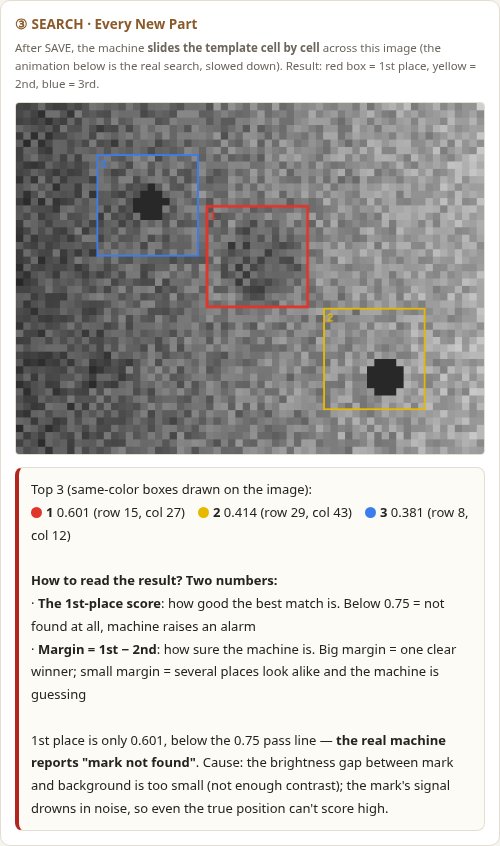
This one cost me real downtime once. Dark mesh screens: I taught the mark, the machine said TEACH OK, and twenty sheets later it reported mark not found.
The teach-time variance check only asks “is there any pattern in the box?” On dark mesh the mark is faint, but it’s there — variance passes, teach succeeds. Production matching asks a much harder question: “does this pattern beat 0.75 against a new, shifted, dirty, badly-lit image?” On dark mesh the mark’s signal drowns in noise:
The fix turned out to be a plain white backing sheet behind the print area. Same mark, same mesh — the score jumps to 0.97:
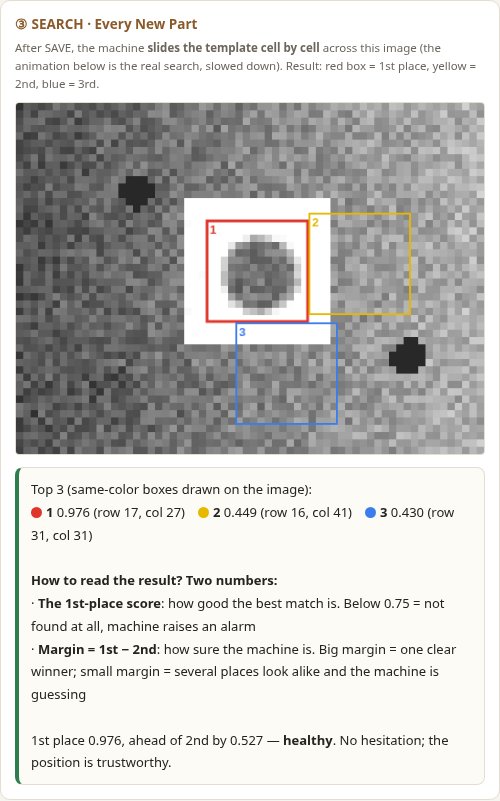
Contrast isn’t a nice-to-have; it’s the raw material the whole algorithm eats. And Teach OK only means the numbers were saved — it makes no promise about whether they’ll survive production.
Lesson 4: The machine won’t warn you when you teach the wrong thing
Once, in the trainer below, I accidentally boxed a dirt speck instead of the mark. On the next sheet the machine didn’t return to that speck — it locked onto a different speck in the opposite corner, and with a higher score (0.810 vs 0.736).
Why couldn’t it even find the same speck? Go back to Lesson 1: the machine stores numbers. It doesn’t know what a “mark” is, or what a “speck” is. It does exactly one thing — take the 340 numbers I saved and find the patch of the image that looks most like them. And since 93% of my box was flat background, any “dark spot on a bright flat background” ended up looking more like my template than the original speck itself.
So the machine didn’t fail. It faithfully found what I taught it to find — I was the one who taught it wrong. And it will never tap me on the shoulder and ask “are you sure that’s the mark?” That judgement is always mine.
Try It Yourself
This is the TEACH screen, simulated. Box the mark in panel ① (drag inside to move, drag the corners to resize) — panel ② shows the exact numbers you’re saving, with the math. Press SAVE and panel ③ replays the production search: the template slides across a shifted, glaring, dirty image, and the top 3 get drawn on the image.
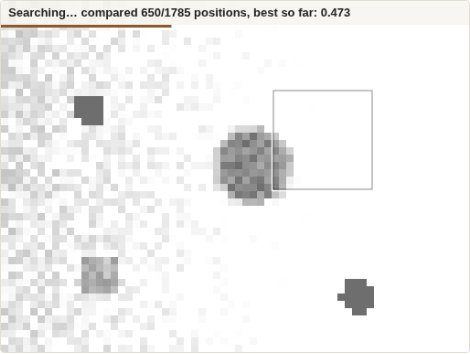
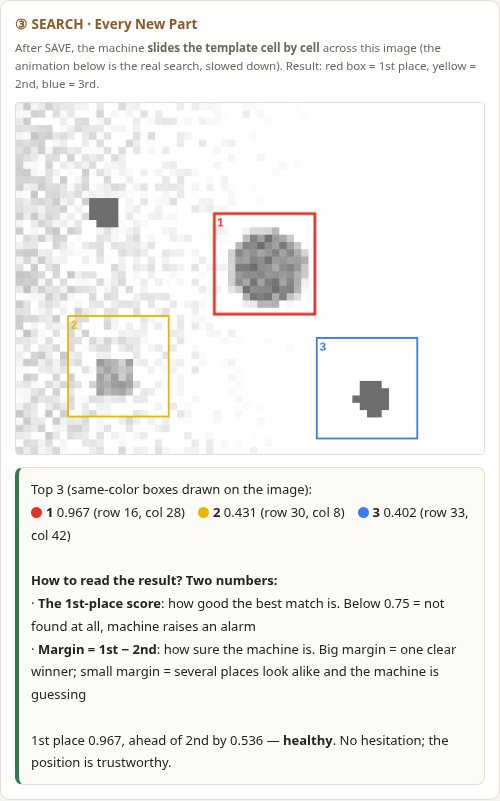
Then run Lessons 2 and 3 yourself: teach with a deliberately oversized box and watch the margin collapse; switch to dark mesh, teach, watch it fail — then add the white filler and watch it recover. Bonus: box the dirt speck in the lower left and see where the machine thinks it went. The Full view button (top right of the tool) expands it to fill your screen.
Open the Teach Mode Trainer in a full page if the embed feels cramped on your screen.
What I Now Check at the Teach Screen
- Box the right thing. The mark, not a speck, not a corner of text. The machine can’t tell the difference — that’s my job.
- Hug the mark. The box should just contain it. Every extra ring of background is a donation to wrong positions.
- Contrast first. If the mark barely stands out to my eye, the numbers will be worse. White filler, clean surface, stable light — fix the physics before touching the software.
- Teach OK ≠ production OK. After teaching, I want to see the machine search a few real sheets. A healthy result isn’t just a high score — it’s a high score with a fat margin behind it.
Terms in This Note
- Teach box — the rectangle you drag at teach time; whatever is inside becomes the template.
- Template — the stored number matrix + target coordinate. Not a picture.
- Variance — the teach-time “is there a pattern” check.
- Dark-cell ratio — how much of the box is actually the mark.
- Search area — the image the template slides across in production.
- Score — similarity at one position, 0 to 1.
- Margin — 1st place minus 2nd place; how sure the machine is.
- Contrast — the brightness gap the algorithm lives on.
This is a learning notebook, not a manual. Terminology and behavior are simplified, and I have no affiliation with any machine manufacturer.