Why Your Screen Won't Wash Out: Over- vs. Underexposed
Image won't wash out after burning? It's almost always overexposure. Symptom table, save-or-scrap decision tree, and the DIY fixes supplier blogs skip.
Your image won’t wash out? In nine cases out of ten the screen is overexposed — UV light hardened the emulsion in areas that were supposed to stay soft.
And here’s the part beginners don’t want to hear: the fix is not “wash harder.” Washing out is not erosion. You’re not sandblasting the emulsion away — you’re rinsing away the parts that are still uncured. If light already cured them, water can’t undo that chemical reaction. Nozzle pressure, hot water, scrubbing — none of it reverses a cure.
So let’s figure out exactly what happened to your screen, whether this one can be saved, and how to never burn a bad one again.
The quick diagnostic table
| Symptom | Most likely cause | Can it be saved? |
|---|---|---|
| Image won’t wash out at all | Overexposed | Almost never — reclaim and recoat |
| Emulsion slides off in sheets, feels slimy | Underexposed, or screen wasn’t fully dry before exposure | No — stop rinsing immediately |
| Big areas open, fine detail plugged | Film not opaque enough, or slight overexposure | Sometimes (see below) |
| Shape washes out but edges are ragged | Film not pressed tight against the mesh, light scatter | Depends on the job |
| Image starts dissolving mid-rinse | Underexposed | Stop now, or lose the whole stencil |
| Same setup worked last month, fails today | Aged emulsion or a dying light source | No — check your supplies |
First, figure out which failure you have
The most confusing thing for beginners: too much light and too little light both ruin a screen — in opposite directions.
Overexposed — the emulsion that should have stayed soft got cured by UV leaking around or through your film positive. Symptom: you rinse and rinse and the image doesn’t move, or you only get a faint ghost of it. Water hits it like it’s glass.
Underexposed — the emulsion that should have cured didn’t. Symptom: the moment water touches the screen, the whole stencil goes slimy and starts sliding off — edges first, then everything.
The shorthand that veterans on r/screenprinting post under every “won’t wash out” thread: if it doesn’t wash out, it’s overexposed. If everything washes off, it’s underexposed. Write that on your darkroom wall.
Save it or scrap it?
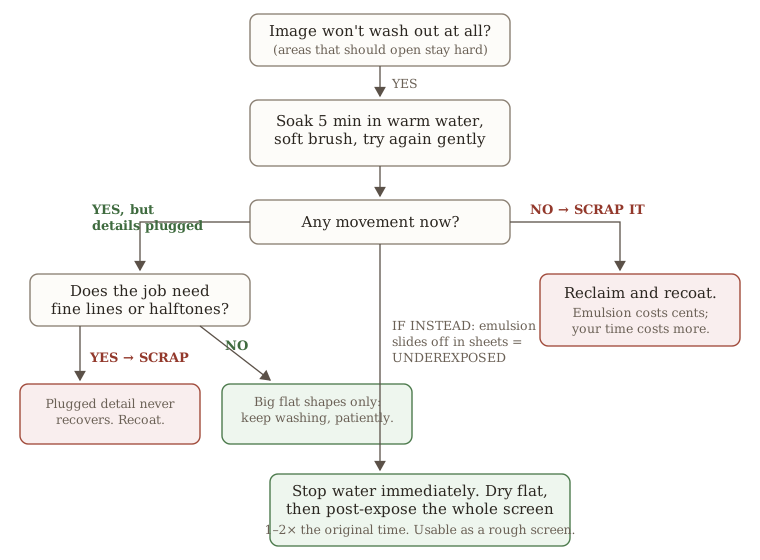
The only overexposed screen worth rescuing is one with big, flat shapes and zero detail. Soak it in warm (not hot) water for three to five minutes to soften the surface layer, then rinse patiently with medium pressure. If it opens up, you got lucky. But if the design has fine lines or halftone dots, don’t bother — even if you force it open, the dots are plugged and will print as a blob.
The one underexposure mistake you can’t walk back: once the emulsion starts sliding off in sheets, stop the water immediately. Keep rinsing and the whole stencil peels off the mesh — rescue chance gone. Instead: lay the screen flat, let it dry completely, then post-expose the whole thing (sun or your exposure unit) at 1–2× the original time. That hardens what’s left. It won’t be a pretty screen, but it can survive a rough one-color job.
The five symptoms, unpacked
1. Nothing washes out at all (the most common)
Work through these in order of probability:
- Exposure time was way too long. Beginners guess times, and guesses drift long. If you’ve never actually measured your exposure time, your time is wrong — full stop.
- Your film positive isn’t black enough. This one fools everyone with a laser printer: the “black” areas pass enough UV to slowly cure the emulsion underneath. Hold the film up to a light — if you can clearly see light through the black parts, it’s not opaque. Inkjet users can double-print or stack two films taped at the corners; laser users can try a toner-darkening spray or a second sheet. (If you’re printing your own separations, our color separation walkthrough covers exporting dense film positives with registration marks.)
- The coated screen sat in light before exposure. Diazo and dual-cure emulsions start reacting the moment they’re coated. A screen left overnight under a fluorescent room light is half-exposed before you ever turn on your unit. Dry coated screens in the dark — a cabinet or a cardboard box works.
- Dead emulsion. Diazo-mixed emulsion keeps about 4–6 weeks in the fridge. If yours is brownish, chunky, or smells sour, it’s done — and it fails exactly like this.
2. The whole stencil slides off, slimy (underexposed)
- The most common cause isn’t time — it’s a screen that wasn’t fully dry. Residual water in the emulsion blocks the cure. “Not wet to the touch” and “dry all the way through” are different things; on a humid day, give it overnight.
- Second cause: a dying light source. Lamp output decays slowly, so your exposure time drifts without telling you. One shop’s 4-minute exposure quietly became 20 minutes before they found the dead tube.
- Whatever you do, don’t hit an underexposed screen with a pressure washer. The uncured stencil peels off the mesh in sheets and takes your rescue options with it.
3. Big areas open, fine detail plugged
Three suspects, in order:
- Film density again — fine detail is the first thing that dies when light bleeds through the “black.”
- Film not tight against the emulsion. Light sneaks under the film edges and eats the lines from below (undercutting). Weight the film with glass or a foam pad. Vacuum lids are expensive for a reason.
- Slight overexposure — enough to kill the detail, not enough to lock the flats.
4. It washes out, but the edges are ragged
Usually not a washout problem at all — it’s light scatter from poor film contact plus overexposure. Printing a big bold logo? Usable. Printing halftones? That screen is trash, and the sawtoothing will print onto every shirt.
5. The image starts breaking apart mid-rinse
That’s the early signal of underexposure. Stop rinsing, dry flat, post-expose. Don’t indulge the “just one more pass” fantasy.
The DIY corner — what supplier blogs won’t tell you
Two years of help threads on r/screenprinting are full of “non-standard” setups that vendor articles pretend don’t exist. Here’s the straight talk:
- The sun works. Emulsion makers have published official sun-exposure tutorials. Midday direct sun cures diazo in 2–3 minutes — faster than almost any lamp, which is exactly why it’s so easy to overexpose. Watch the color shift: diazo goes from bright green to a dull gray-green as it cures.
- A 500W halogen work light works — kind of. One camp has burned a thousand screens with one; the other says you’ll never dial it in. Both are right. It works, but the filament ages and your exposure time drifts. Retest every time you change the bulb.
- Double up your film. Laser print not dark enough? Print two copies, align them, tape the corners. It’s the standard forum answer because it works.
- Wet the screen before carrying it outside. This is the best tip we’ve ever seen in a forum thread — and we checked, not one of the top-ranking articles mentions it. After exposure, mist both sides of the screen with water before walking it to the outdoor tap. Wet emulsion is far less light-sensitive, so that 30-second walk through sunlight won’t expose your image shut.
- You don’t need a pressure washer to rinse a freshly exposed screen. A garden hose or shower head is plenty. Pressure washers are for reclaiming old screens — a different job. Vendor articles love to blur the two, and beginners end up thinking a $100 machine is mandatory.
The permanent fix: measure your exposure time once
Ninety percent of washout problems are exposure problems wearing a disguise. And there is no universal correct exposure time — yours depends on your light, your emulsion, your mesh count (not sure which mesh you’re on? Try our mesh selector tool), and how thickly you coat. The only honest way to get it is an exposure calculator (step wedge) test:
- Place the calculator film on a coated screen and expose at 2–3× your best-guess time;
- Rinse, then read which step is the last one fully cured (on a 21-step wedge, you’re looking for step 7);
- Multiply back by the factor to get your correct time.
We wrote the full walkthrough with the math worked out: How to Find Your Exposure Time: A Step-by-Step Guide to Exposure Calculators. It takes five minutes per test. Retest when you change bulbs, emulsion batches, or mesh counts — each retest is cheaper than one ruined screen.
Here’s Colin from Ryonet showing the whole expose-and-washout routine, including how to read the stencil as you rinse:
When the screen is dead: reclaim it properly
Don’t scrape. Spray emulsion remover on both sides, brush it in, wait a minute or two — and don’t let it dry on the screen (dried remover-plus-emulsion is a pressure-washer-level problem you don’t want). Rinse clean, then hold the screen up to a light: every mesh opening should be clear. Ghost stains and haze are a separate topic with their own chemistry.
FAQ
Does hot water help wash out an overexposed screen? Warm water, slightly — it softens the surface layer and can rescue big flat shapes. Hot water attacks the mesh adhesive. And neither will recover plugged detail.
If I leave an overexposed screen alone for a few days, will it wash out then? No. Curing is a chemical reaction and it’s irreversible. Time changes nothing.
Same emulsion, same lamp — why did 4 minutes work last time but not today? Your lamp’s output decayed, or the temperature and humidity changed. Exposure times drift. That’s why experienced printers retest every time anything in the chain changes.
Can I use a pressure washer on a freshly exposed screen? You can, but there’s no reason to — and on an underexposed screen it’s catastrophic, stripping half-cured emulsion straight off the mesh. Save the pressure washer for reclaiming.
Should I expose the screen again after rinsing? Yes. Once the rinsed screen is dry, post-expose the whole thing — especially if you print water-based or discharge inks. It roughly doubles stencil durability, and it’s the difference between a screen that survives a water-based run and one that dissolves mid-job.
A washout failure is never really a washout problem — it’s an exposure problem showing its symptom at the sink. Water doesn’t lie: won’t open means too much light; slides off means too little. Measure your exposure time once, write the number on the darkroom wall, and this problem disappears from your life.